Official Meta-Approved WhatsApp Business API Provider
Click Tracking: Smarter Insights, More Conversions
• Track how many users clicked your WhatsApp CTA button.
• Monitor total click activity & measure engagement in real time.
• Retarget engaged users on WhatsApp and drive up to 3x more conversions.

Real Humans. Real Help. 24×7 Live Support.

Dedicated Manager

Chat Support

Call Support
Founders & Marketers Love us
Trusted by thousands of businesses across the globe to streamline messaging and customer engagement.
Start for FREE
Track Clicks on Your WhatsApp Messages
Know how many people clicked your WhatsApp CTAs, track engagement trends, and retarget them to drive more conversions.
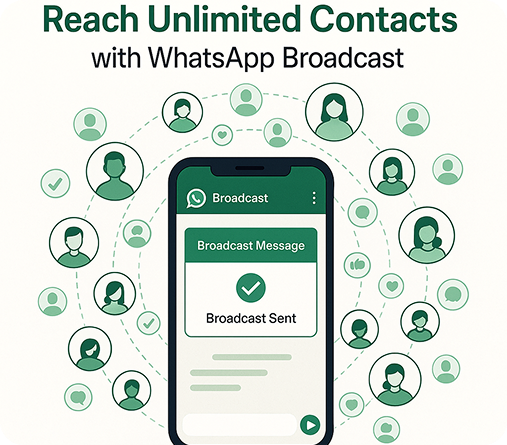
Reach Unlimited Contacts
Broadcast your message to as many contacts as you want, without limits or restrictions.
Hyper-Personalized Messaging
Create automated flows quickly—no developers required.
Visually Rich Campaigns
Get actionable analytics and optimise campaigns instantly.
Smart Audience Targeting
Share workload, avoid duplication, resolve messages faster.
Campaigns on Your Schedule
Share workload, avoid duplication, resolve messages faster.
Integrates With Your Tools
Share workload, avoid duplication, resolve messages faster.

Track Clicks. Retarget Smarter. Convert More.
Analyze click performance, measure engagement, and re-engage your audience instantly through WhatsApp.
📈 Measurable Reach & Real-Time Insights
Track every click, interaction, and engagement on your WhatsApp campaigns, all in one powerful dashboard.
With Rampwin’s Click Tracking, you can see how many people clicked your message links, measure campaign success, and optimize future broadcasts for higher conversions.
🎯 Targeted, Smarter Optimization
Use click tracking insights and past campaign data to identify your most engaged users and re-target them at the right moment.
Rampwin helps you analyze click behavior, audience patterns, and timing, so every campaign becomes smarter, more relevant, and more effective.
📊 Measurable Results in Real Time
Track every click, interaction, and engagement across your WhatsApp campaigns in real time, all within Rampwin’s powerful analytics dashboard.
See exactly how many people clicked your message links, monitor campaign reach and engagement.
⚙️ Flexible Scheduling & Retargeting Automation
Plan your click-based retargeting campaigns in advance and let Rampwin handle the rest, automatically.
With seamless CRM and eCommerce integrations, Rampwin helps you re-engage users who clicked your messages, send timely follow-ups, and convert interest into action, all without manual effort.
How It Works
6 Simple Steps to use Click Tracking
Step 1
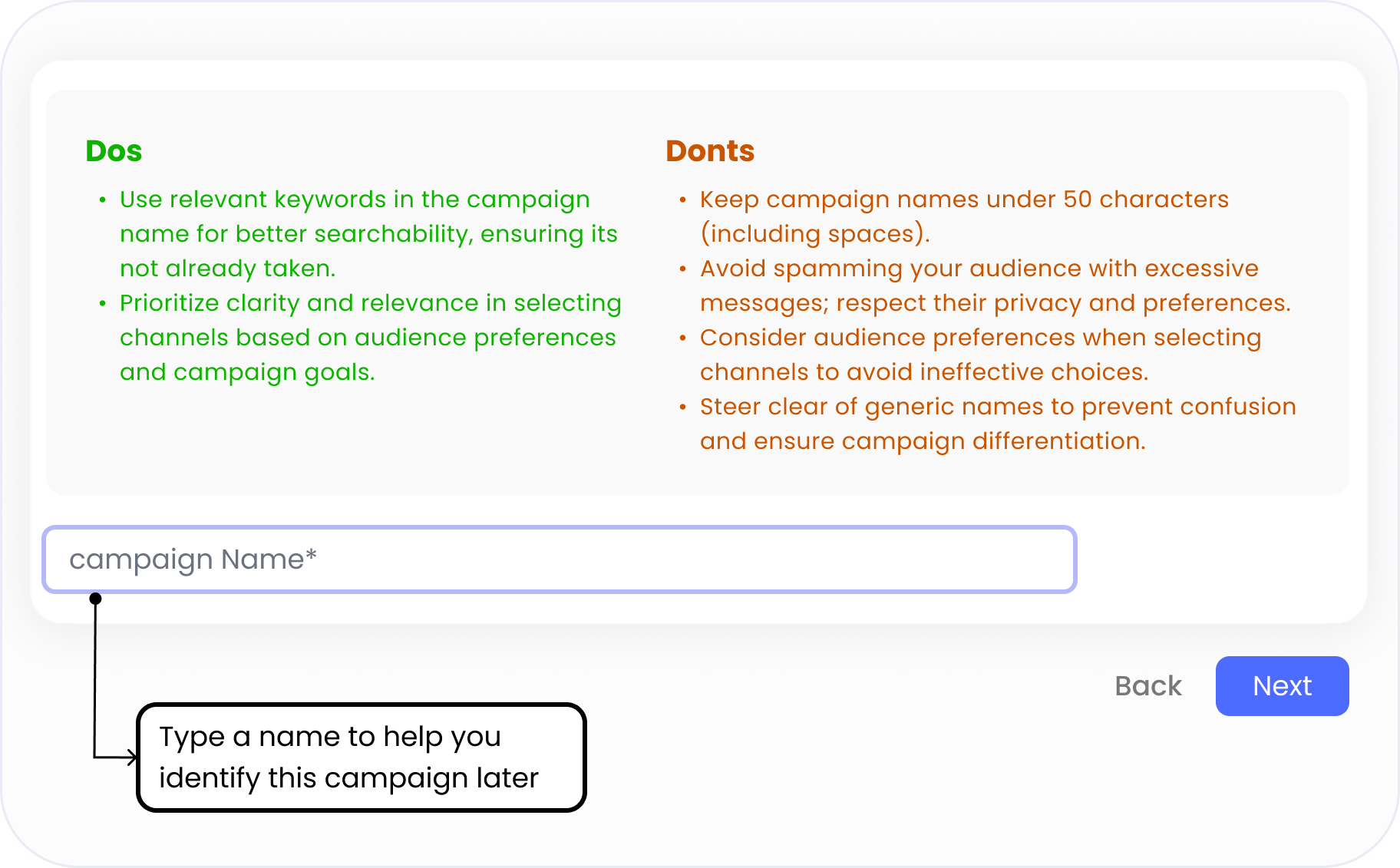
Name Your Campaign
Takes ~30 seconds – 1 minute
- Go to the “Broadcasts” tab and click “Create Campaign.”
- Give your campaign a clear, keyword-friendly name (max 50 characters).
- A good name helps you track performance and search for campaigns later.
Step 2
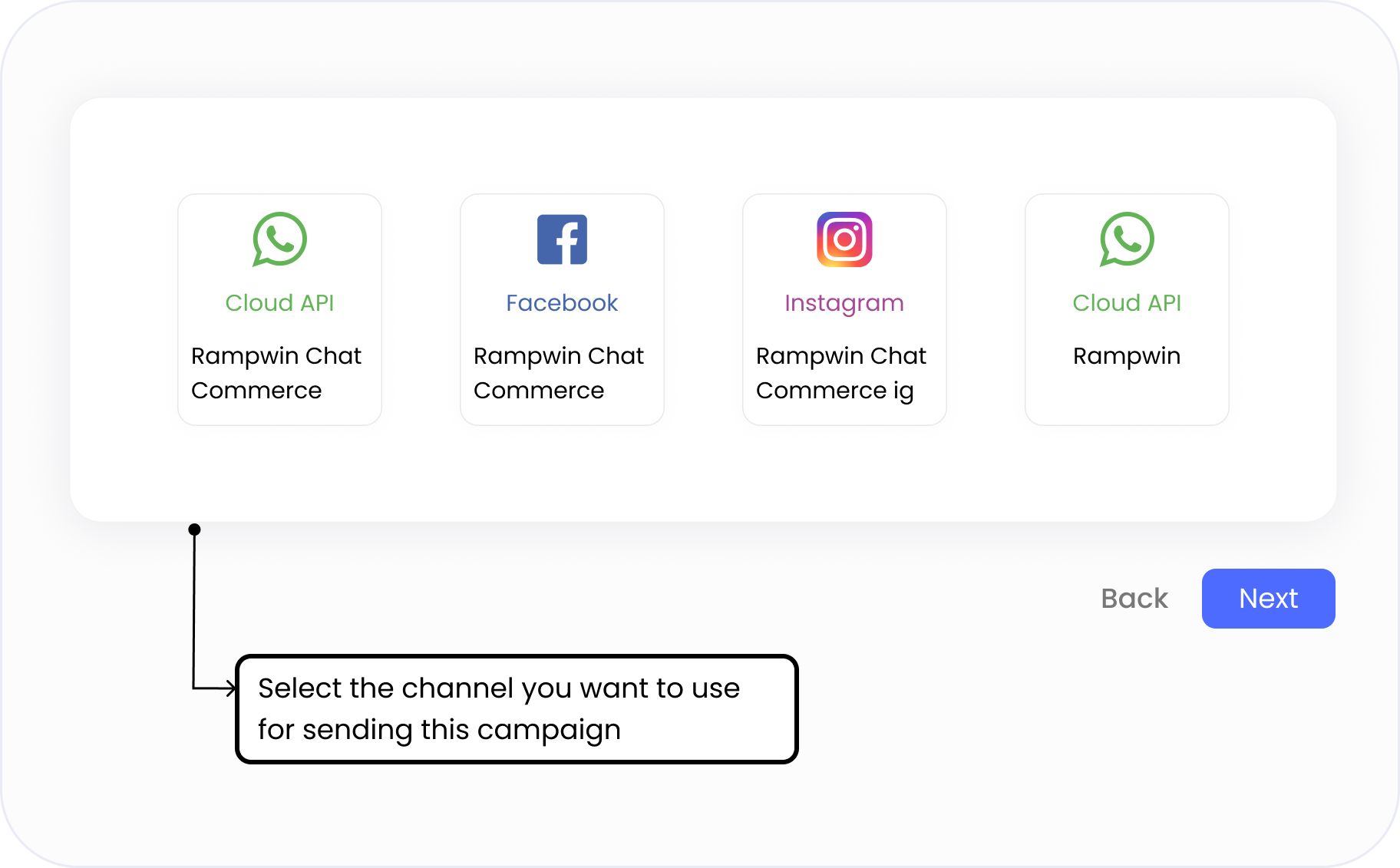
Choose Your Sending Channel
Takes ~15 seconds
- Pick the WhatsApp number, Facebook page, or Instagram account you want to send your campaign from.
- Each campaign is linked to a specific sender — making it easier to track performance and manage replies.
- Use names like Rampwin Chat Commerce, Rampwin Support, or Rampwin IG to align with your communication goal (sales, support, announcements).
- Channels marked with Cloud API indicate verified WhatsApp Business senders.
Step 3
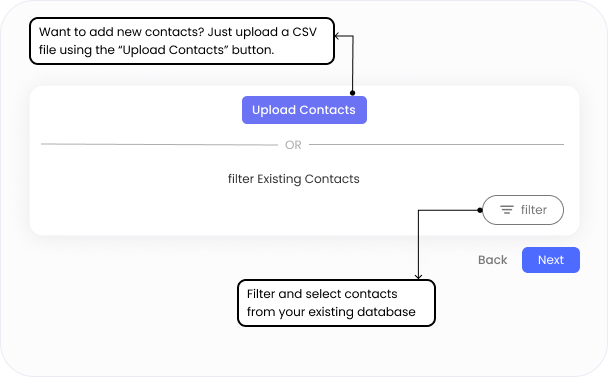
Select or Upload Your Audience
Takes ~30 seconds – 1 minute
- Choose from your existing contacts using filters like tags, names, company, or past actions.
- Or click “Upload Contacts” to add a fresh list via CSV — no complex formatting required.
- Use filters like blacklist status, appointment date, or reseller type to segment precisely.
- Targeting the right people improves engagement and lowers opt-outs.
Step 4
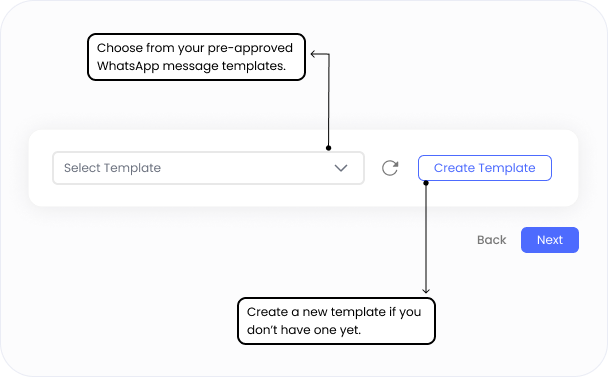
Choose a Message Template
Takes ~1–2 minutes
- Select from your approved WhatsApp message templates using the dropdown.
- You can search by name to quickly find the right template.
Each template is pre-approved by WhatsApp and categorized (e.g., quiz, carousel, lead drop). - Need a new one? Click “Create Template” to submit a fresh message for approval.
- Use variables (like customer name or order ID) to personalize your message dynamically.
Step 5
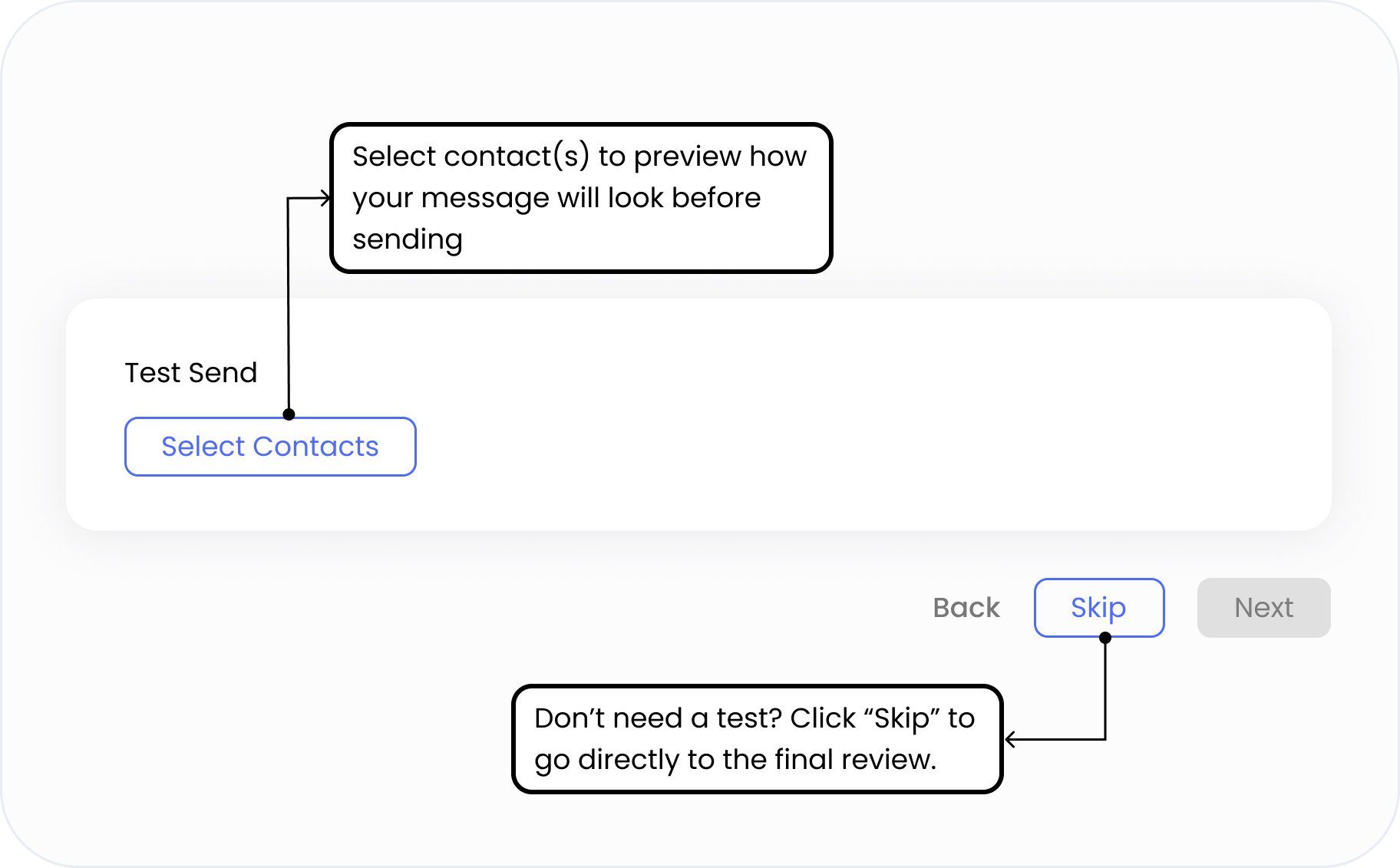
Send a Test Message
Takes ~10 seconds
- Choose one or more internal contacts to preview your message before it goes live.
- Ensure variables (like name or order ID) display correctly, and the format looks perfect.
- This helps you catch typos, layout issues, or delivery problems before sending at scale.
- You can also skip this step if you’ve already tested the template before.
Step 6
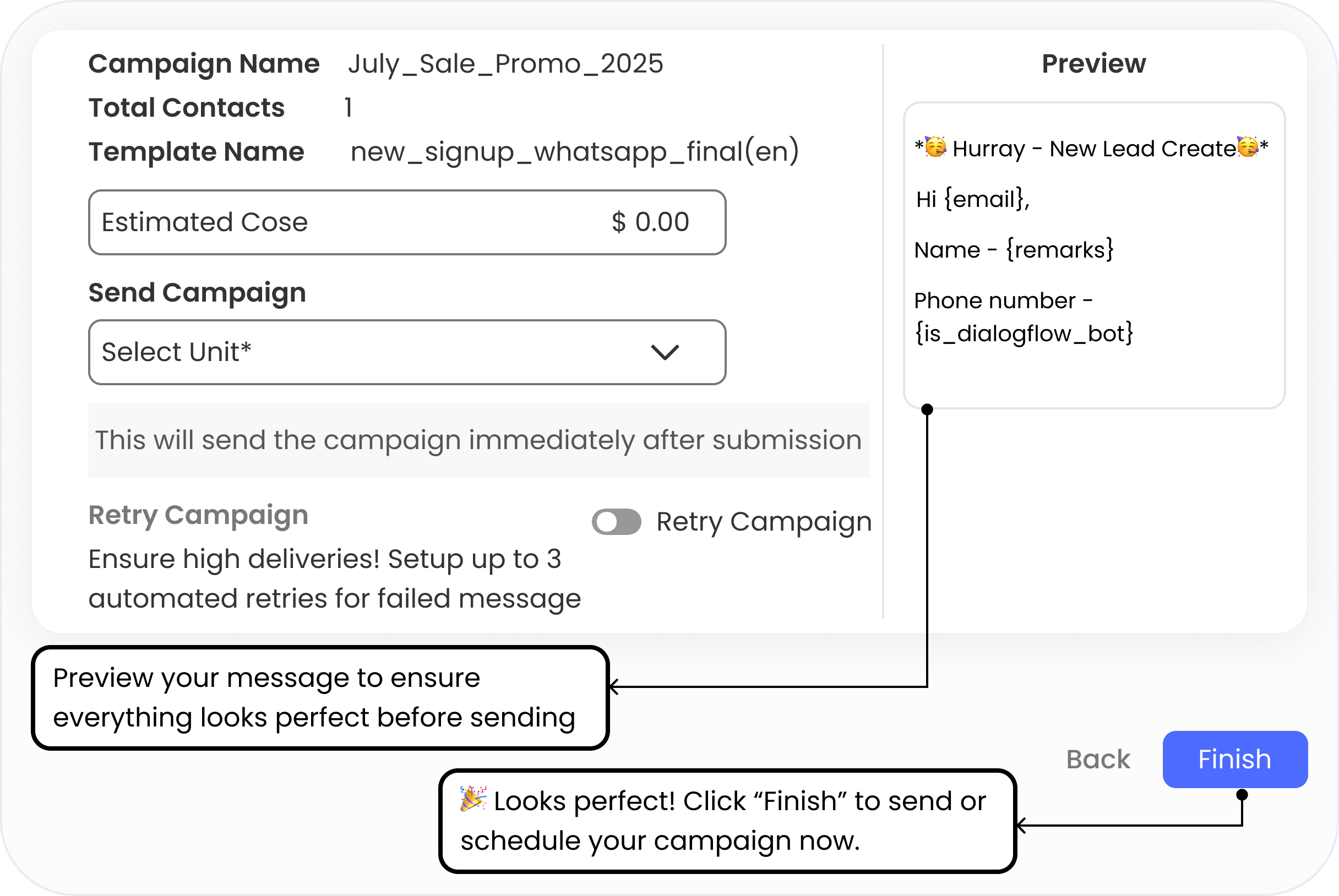
Review & Launch Your Campaign
Takes ~15 seconds
See a complete summary of your campaign, including:
- Campaign name
- Total contacts selected
- WhatsApp template used
- Estimated cost
- Preview your personalized message before sending.
- Choose when to send: Immediately or Schedule for later.
- Optionally enable “Retry Campaign” to automatically resend to failed numbers.
Q 1. What kind of click tracking does Rampwin offer?
Rampwin allows you to track how many users clicked on the CTA buttons in your WhatsApp messages.
Q 2. Can I see which individual users clicked on my WhatsApp message?
No, Rampwin currently tracks total click activity, not individual user-level clicks. However, you can still use this data to analyze performance, identify high-engagement campaigns
Q 3. How does click tracking help improve campaign performance?
Click tracking gives you a clear picture of what’s working in your WhatsApp campaigns. By seeing which messages get the most clicks, you can optimize your content, adjust CTAs, and boost conversion rates in future broadcasts.
Q 4.Can I retarget users who clicked on my WhatsApp messages?
Yes, you can retarget your engaged audience based on overall click performance.
Q 5.Where can I view my WhatsApp click analytics in Rampwin?
You can view click tracking and engagement analytics directly inside your Rampwin dashboard.
Frequently Asked Questions
Start Tracking Your WhatsApp Clicks Today
No setup hassle. No tech skills required.
Start tracking WhatsApp clicks and see results instantly.